

Putting Documentation Where the Work Happens with AI
- engineering,
- ai,
- AI for Compliance,
- documentation
When we wrote about our first AI features, we made a promise to ourselves that we wouldn't bolt a generic chat bot onto the side of the product. We preferred no answer to a hallucinated one. We wanted focused, contextual tools that reduce friction without replacing human judgment. Real trust comes from knowledge, not from artifacts alone, and our founding team has deep knowledge of the compliance space.
This next thing we built with that promise in mind started from a pretty unglamorous (and annoying) observation: our knowledge was in the wrong place.
The knowledge was in the wrong place
Compliance can be hard, usually due to the language of the controls. Frameworks like SOC 2, ISO 27001, and NIST 800-53 are dense, cross-referential, and full wording that means something very specific, and not at all obvious. Though we have spent years building up real understanding about how these controls actually work, all of that knowledge lived only in our brains, and then eventually in our docs. But, our docs were still not where our users were. Understanding them required visiting a separate site, in a separate tab, and being in a separate headspace from the place where a user was actually trying to get something done. Someone looking at control CC5.3 in the product, unsure what it wanted from them, had to first know that the answer existed in our docs, stop what they were doing, go search the docs, read and understand what they found, and carry the answer back in their head. Every one of those steps is a place to lose the thread.
We were also paying for that gap twice. To make the product usable on its own, we had started copying explanations into the UI. A tooltip here, some helper text there, a paragraph of guidance baked into a form. Now the same idea lived in two places: the canonical version in the docs, and a slightly stale paraphrase in the product. Two sources of truth is a polite way of saying zero sources of truth. What we wanted was one body of knowledge, written once, that showed up wherever it was needed.
Choosing help over chat
The reflexive answer is "add a chatbot", but that still required the user to know what they needed and ask for it. Instead, we would rather the answer presented itself to them as they realized they needed it, along with detailed context. Further, none of the existing tooling on the market did what we wanted without being prohibitively expensive for what is, in 2026, a fairly simple engineering problem.
What our users need in the moment is not a conversation. It is this control, explained, right here. So we built context-aware help: a small "Docs" tab and in context "what does this mean" next to a topic that opens a slide-out with the documentation for exactly that thing, plus a link to the full page. Nothing to compose, no back and forth, no waiting on a model to write prose.
That framing bought us something big for compliance content. It retrieves the relevant doc sections and shows them along side a summarized version, however, always pointing the user back to the full docs. On subject matter where a confidently wrong sentence can send someone down the wrong remediation path, "we only show you what the docs actually say" is the whole point.
Building it
Turning MDX (Markdown + JSX) into something searchable
Our docs are written in Docusaurus as MDX. Great for humans, rough for a naive indexer. Most of our pages import custom React components, and on a lot of the control pages the actual substance lives inside those components. Point a plain Markdown reader at the raw .mdx and you get a soup of JSX tags, and worse, you drop the content that matters most.
So we index the built site, not the source code. Docusaurus renders everything into static HTML, components and tabs and admonitions and even content pulled in at build time. We pull text out of that, which means what we index is exactly what a reader sees. Simplified for brevity:
1// Extract each built page to Markdown, keeping a Title/Source header2// so retrieved chunks can link back to the real page.3import { load } from 'cheerio'4import TurndownService from 'turndown'56const td = new TurndownService({ headingStyle: 'atx' })78for await (const rel of new Bun.Glob('**/*.html').scan(BUILD_DIR)) {9 const $ = load(await Bun.file(rel).text())10 const url = $('link[rel="canonical"]').attr('href') ?? ''11 const body = $('.theme-doc-markdown').first() // the rendered doc content only12 const md = td.turndown(body.html() ?? '')13 await Bun.write(out(rel), `Title: ${$('title').text()}\nSource: ${url}\n\n${md}`)14}
The "Source:" line looks simple but is doing a lot of work. It is how every result in the product links back to the page it came from, and how we later pull the whole page back out of storage.
Indexing in a managed store
We index into a Vertex AI RAG Engine corpus. Create the corpus, import the extracted files from a Cloud Storage bucket, and the managed service takes care of chunking and embeddings. Simplified for brevity:
1const [op] = await client.createRagCorpus({2 parent: `projects/${PROJECT}/locations/${LOCATION}`,3 ragCorpus: {4 displayName: 'openlane-docs',5 vectorDbConfig: { ragManagedVertexVectorSearch: {} }, // serverless managed store6 },7})8const corpus = (await op.promise())[0]910await client.importRagFiles({11 parent: corpus.name,12 importRagFilesConfig: {13 gcsSource: { uris: ['gs://.../openlane-docs/'] },14 ragFileTransformationConfig: {15 ragFileChunkingConfig: { fixedLengthChunking: { chunkSize: 1024, chunkOverlap: 200 } },16 },17 },18})
Serving retrieval
The product calls a small endpoint that retrieves the most relevant chunks, drops them to one per page, and ranks them with a hint about which page this particular screen should favor. Simplified for brevity:
1const [resp] = await rag.retrieveContexts({2 parent,3 query: { text: topic.query, ragRetrievalConfig: { topK: 50 } },4 vertexRagStore: { ragResources: [{ ragCorpus }] },5})67const pages = rankChunks(dedupeBySource(resp.contexts?.contexts), topic.prefer)
The summary is a separate step and it is only allowed to use the chunks we just retrieved. If it cannot answer from them it returns a NO_ANSWER sentinel and we show the source sections on their own.
Surfacing it where the work happens
We did not want help to be something you go looking for, so we pinned the "Docs" tab to the right edge of the app, present on every page. Open it, and a panel slides out with a short intro to where you are, a summary drawn only from the docs, the relevant source sections, and a search box if you want to ask something specific. It is mounted globally, so it is always one click away.
The nice part about all this was how little UI we had to build. Our system already had an InfoSlideOut component, a resizable right hand panel with a title and a docs link, used in a few other spots. The Docs tab is mostly that component, fed with retrieved doc sections. It looks and behaves like the rest of the app because it is the rest of the app.
Additionally, the tab always knows where you are in our UI, so it can pull the most relevant data based on navigation context. This doesn't always work as planned, so a small route table allows for overrides of the default topic using prefer and maps the current path to a docs topic, anything that doesn't need a specific override falls back to a topic derived from the last part of the URL and page context. Open the tab on the controls page and it asks the docs about controls. Open it while creating a policy and it asks about creating a policy. Simplified for brevity:
1const ROUTE_TOPICS = [2 ['/controls', { title: 'Controls', query: 'list controls', prefer: 'Controls Overview' }],3 ['/controls/create', { title: 'Create a Control', query: 'create a control', prefer: 'Writing Controls' }],4 ['/policies', { title: 'Internal Policies', query: 'list internal policies' }],5 ['/evidence', { title: 'Evidence Center', query: 'evidence collection' }],6]78const topicForPath = (pathname: string) =>9 ROUTE_TOPICS.find(([prefix]) => pathname === prefix || pathname.startsWith(`${prefix}/`))?.[1]10 ?? deriveTopicFromSegments(pathname) // strip ids, humanize the last segment
Links inside a doc that point back into our docs open the drawer in place, so you can read across pages without ever leaving the product. When the docs do not cover what someone needs, the panel offers a clean handoff into our support chat, so the dead end becomes a conversation with a person instead.
Showing whole sections, not fragments
Retrieval gives you chunks, and a chunk can end mid sentence. For a summary that is fine, but for the "read the actual docs" part it looks broken. So once retrieval tells us which page is the right one, we go back to the bucket, pull the full extracted page, and slice out the exact section we want by heading. The reader gets a complete, coherent section, not whatever the embedding window happened to cut. Simplified for brevity:
1// topChunk.sourceUri is the gs:// path of the page this chunk came from2const page = await fetchGcsFile(storage, topChunk.sourceUri) // gs://.../a-doc.md3const section = extractMarkdownSection(parseChunk(page).text, topic.extractSection)
That header we wrote during extraction, and the fact that we kept the original files in the bucket, are what make this cheap. Retrieval finds the page, storage hands back the whole thing, and a little Markdown parsing does the rest.
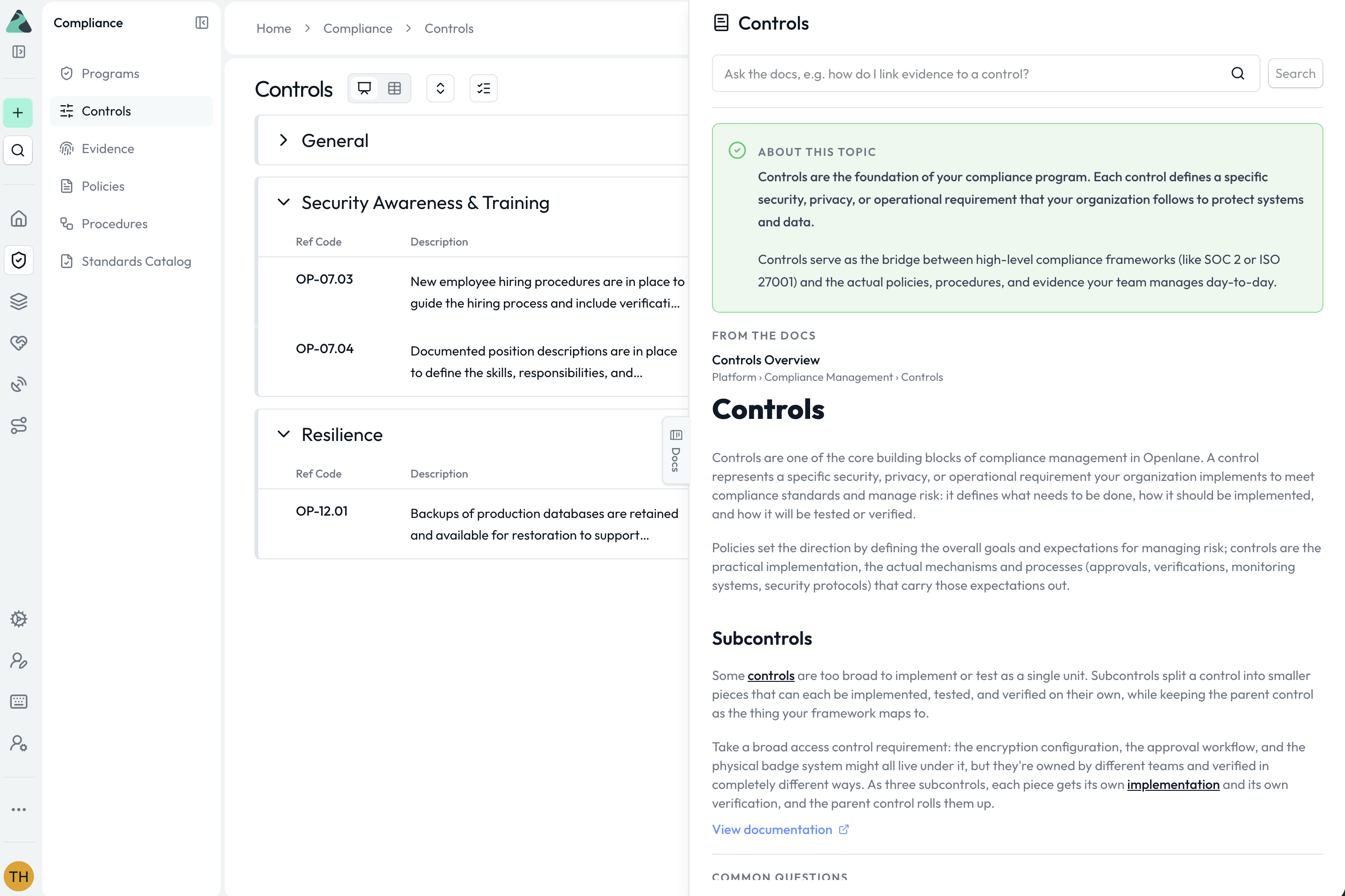
Docs always a click away, keeping the user in the context of their work
Where this leaves us
The docs are now written once, in one place, by the people who own them. They show up in the product, in context, next to the work. There is no second copy to maintain and nothing to drift. When we improve how we explain a control, that improvement is live in the UI on the next release, with a link straight back to the source.
We kept the surface area small on purpose. The Docs tab is always one click away, it knows what page you are on, and every answer shows the source sections with links back. The summary layered on top is only allowed to speak from what we retrieved, and when it has nothing solid to say, it says nothing. The same docs corpus now quietly backs a few other places in the product where a little context helps, and there is plenty more room to add in-context entry points for more clarity as we continue to build.
The lesson underneath all of it is the boring one, and it is the same one from our first AI features: The highest leverage move was not a model. It was putting the knowledge we already had in the one place our users were already looking.
Want to dig deeper? All of our code is open source, so you can check out the frontend changes in our Console repo, explore our docs to learn more about compliance and how Openlane works, or sign up for a free trial and try it out for yourself.




'%3e%3cg id='Final-Copy-2_2_' transform='translate(1275.000000, 200.000000)'%3e%3cpath class='st0' d='M7.4,12.8h6.8l3.1-11.6H7.4C4.2,1.2,1.6,3.8,1.6,7S4.2,12.8,7.4,12.8z'/%3e%3c/g%3e%3c/g%3e%3c/g%3e%3cg id='final---dec.11-2020'%3e%3cg id='_x30_208-our-toggle' transform='translate(-1275.000000, -200.000000)'%3e%3cg id='Final-Copy-2' transform='translate(1275.000000, 200.000000)'%3e%3cpath class='st1' d='M22.6,0H7.4c-3.9,0-7,3.1-7,7s3.1,7,7,7h15.2c3.9,0,7-3.1,7-7S26.4,0,22.6,0z M1.6,7c0-3.2,2.6-5.8,5.8-5.8 h9.9l-3.1,11.6H7.4C4.2,12.8,1.6,10.2,1.6,7z'/%3e%3cpath id='x' class='st2' d='M24.6,4c0.2,0.2,0.2,0.6,0,0.8l0,0L22.5,7l2.2,2.2c0.2,0.2,0.2,0.6,0,0.8c-0.2,0.2-0.6,0.2-0.8,0 l0,0l-2.2-2.2L19.5,10c-0.2,0.2-0.6,0.2-0.8,0c-0.2-0.2-0.2-0.6,0-0.8l0,0L20.8,7l-2.2-2.2c-0.2-0.2-0.2-0.6,0-0.8 c0.2-0.2,0.6-0.2,0.8,0l0,0l2.2,2.2L23.8,4C24,3.8,24.4,3.8,24.6,4z'/%3e%3cpath id='y' class='st3' d='M12.7,4.1c0.2,0.2,0.3,0.6,0.1,0.8l0,0L8.6,9.8C8.5,9.9,8.4,10,8.3,10c-0.2,0.1-0.5,0.1-0.7-0.1l0,0 L5.4,7.7c-0.2-0.2-0.2-0.6,0-0.8c0.2-0.2,0.6-0.2,0.8,0l0,0L8,8.6l3.8-4.5C12,3.9,12.4,3.9,12.7,4.1z'/%3e%3c/g%3e%3c/g%3e%3c/g%3e%3c/g%3e%3c/svg%3e)